Configure Sequence
1. Configuring Invoice Sequence Modes (Continuous vs. Device-Specific)
Depending on your store size and how many billing counters or mobile devices operate in your business, InventoryPlus Desktop offers two invoice sequence modes.
Accessing Sequence Options:
- Open InventoryPlus Online window from Online Feature from the main menu.
- Click Options.
- Select your preferred Billing Sequence Mode:
Option A: Continuous Sequence Mode (Recommended for Single/Connected Stores)
- How it Works: All billing counters and mobile devices share one unified invoice sequence (e.g., Invoice #1001, #1002, #1003).
- Best Used For: Businesses that require strictly sequential invoice numbering across all cash registers for strict accounting compliance.
- How InventoryPlus Manages It: The cloud server dynamically leases sequential number blocks to each active billing counter in advance, ensuring no two counters generate duplicate invoice numbers.
Option B: Device-Specific Sequence Mode (Recommended for Multi-Counter / Heavy Volume Stores)
- How it Works: Each billing counter or mobile device uses a unique prefix combined with its own independent sequence number.
- Counter 1: C1-1001, C1-1002, C1-1003
- Counter 2: C2-1001, C2-1002, C2-1003
- Mobile App / Field Sales: MOB-1001, MOB-1002
- Best Used For: High-volume retail stores, supermarkets, or multi-branch operations where each billing station operates independently without relying on real-time network communication with other counters.
- Setting up Prefixes: Enter your desired prefix (e.g., C1-, POS2-, MOB-) in the Device Prefix box and click Save.
2. Temporary Sequences & Automatic Renumbering (Offline Billing)
One of the biggest concerns for retail businesses is internet disruption during peak customer hours. InventoryPlus Desktop features an intelligent offline billing engine that guarantees zero customer waiting time.
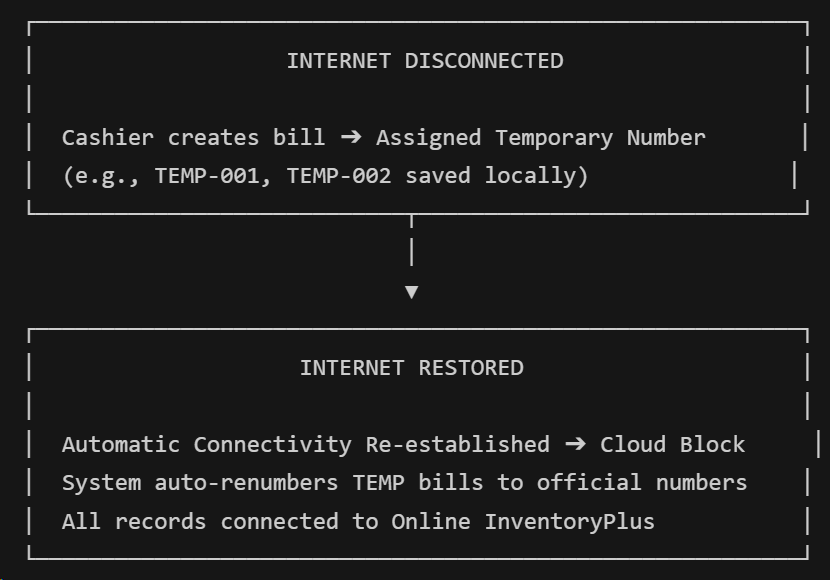
How Offline Temporary Sequences Work:
- Uninterrupted Billing: When internet connectivity drops, InventoryPlus Desktop automatically switches to local offline mode. You can continue issuing bills without interruption.
- Temporary Sequence Assignment: Offline invoices are temporarily assigned internal sequence markers.
- Automatic Re-numbering & Reconciliation:
- As soon as internet connection is restored, InventoryPlus Desktop re-establishes connectivity with Online InventoryPlus.
- The system automatically claims official, server-approved sequence numbers for all pending offline bills.
- Bills are seamlessly renumbered in order and uploaded to the cloud portal.
- Audit trails, customer ledgers, and stock balances update automatically without manual intervention or duplicate bill number conflicts.
3. Understanding Sequence Blocks & Background Pre-Fetching
To deliver instantaneous billing speeds, InventoryPlus Desktop uses an advanced Sequence Block & Pre-Fetching System.
What is a Sequence Block?
Instead of requesting an invoice number from the internet every single time a cashier clicks "Save Bill" (which could cause delay if internet speed fluctuates), Online InventoryPlus allocates a reserved range of numbers (a Sequence Block) to InventoryPlus Desktop in advance (e.g., Numbers 5001 through 5050).
How Pre-Fetching Eliminates Billing Delays:
- Normal Operation: As bills are issued on the desktop, numbers are used sequentially from the active block.
- Smart 80% Threshold Pre-Fetch: When your active sequence block reaches 80% usage (e.g., when bill #5040 out of 5050 is generated), InventoryPlus Desktop automatically communicates with the cloud in the background to request the next sequence block (e.g., Numbers 5051 through 5100).
- Zero Delay for Cashiers: The next block is ready before the current one runs out, ensuring your cashiers experience instant bill creation even during festival rush hours.
4. Generating Continuous Web Billing Using Block Size 1 (Zero Delay for Cashiers)
In high-speed retail environments where billing takes place simultaneously on InventoryPlus Desktop store counters and Online InventoryPlus web browsers or mobile devices, maintaining a single unified bill sequence (e.g. Invoice #1001, #1002, #1003) across all devices is crucial.
How Web Billing Works with Block Size 1:
- Instant Real-Time Allocation (Block Size = 1):
- When a cashier or field salesperson creates a bill on Online InventoryPlus (my.inventoryplus.in), the system requests a single sequential bill number (Block Size = 1) from the cloud sequence engine at the exact moment the bill is saved.
- Zero Delay & No Number Waste:
- Because numbers are allocated individually on demand for web and mobile transactions, no extra sequence numbers are held or reserved in advance. If a web browser is closed or refreshed, no invoice numbers are skipped or wasted.
- Seamless Multi-Device Coexistence:
- InventoryPlus Desktop counters pre-fetch sequence blocks (e.g. 50-number blocks) for high-speed store billing with offline resilience, while web/mobile users claim single numbers (Block Size = 1) instantly in real time.
- Guaranteed Zero Delay for Cashiers:
- Store cashiers and mobile billing staff experience instant, zero-delay invoice creation with zero risk of duplicate bill numbers or skipped invoice sequences across your entire business network.